Getting Here & Parking
Rick Husband Amarillo International Airport is located at 10801 Airport Boulevard, approximately 2 miles north of East I-40 (Exit 76), and approximately 7 miles east of downtown Amarillo. We recommend passengers arrive 1.5 hours before their scheduled flight departure time.
Parking Reservations are now available!
You can now secure a parking space in just a few clicks! Like booking a flight or a hotel, but just the easy part. Choose dates, choose parking, and pay! A convenience surcharge may be added to reserved parking charges. Click here read our FAQs for reservations.
We offer a variety of paid and free parking options for your convenience.
Paid Parking Options
We accept payments via cash, Amex, Visa, and MasterCard.
Parking Garage
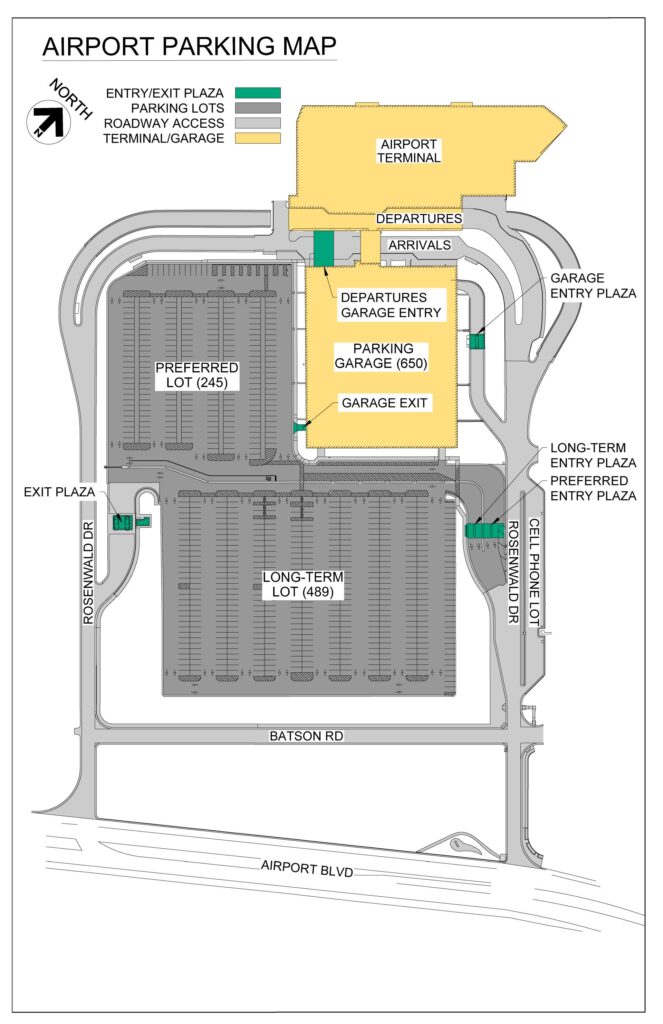
Our Parking Garage offers 650 covered spaces and is located closest to the terminal entrance. We also offer two surface lots for passenger parking.
- $3.00 per half hour
- $17.00 per day
Preferred Parking
The Preferred Parking has 245 parking spaces and provides customers with close proximity parking to the lower level of the terminal building.
- First 30 Minutes Free
- $3.00 per half hour
- $15.00 per day
Long-Term Parking
The outdoor Long-Term Parking has 489 parking spaces.
- First 30 Minutes Free
- $3.00 per hour
- $12.00 per day
Free Parking
The Airport offers two options at no charge for customers when picking up passengers.
Cell Phone Lot
The Cell Phone Lot is located adjacent to Rosenwald Drive at the Airport’s entrance. Customers wait in their vehicle for their passenger to notify them via cell phone that they are ready to be picked up in front of the terminal building. Please note that you will need to stay with your car while using the Cell Phone Lot.
Preferred and Long-Term Parking
You may also park for free for the first 30 minutes in the Preferred or Outdoor/Long-Term Parking area.
Persons with Disability Placard or License Plates
All vehicles with a standard, state-issued Persons with Disabilities Parking Placard and/or License Plate will pay full rates for handicap parking.
Military Vehicle License Plates
Airport Parking fees are waived for vehicles bearing Disabled Veteran license plates issued by the State of Texas or any other U.S. state that indicate on the face of the license plate that the owner of the vehicle is a Disabled Veteran of the United States armed forces.
Ineligible plates include
- Vehicles displaying dealer’s temporary tags or any cardboard or paper tags are ineligible for the waiver.
- Vehicles issued qualifying license plates, but owner has elected not to mount them.
- Any vehicle with a standard State issued Persons with Disabilities Parking Placard and/or License
How to have your fees waived
- Vehicle bearing the qualifying license plates must be present. If you do not have Disabled Veterans Plates you will have to show proof and an ID to receive this benefit.
- Driver must pull a ticket when entering through the AMA Airport Plaza entry lanes.
- Drivers must exit through a manned, cash lane.
- The attendant will verify qualifying plates on the vehicle and waive any charges.
For any question, please call Laz Parking at 806-335-1921.
Reserved Parking FAQs
Prepare before your trip
Once you have a reservation, be sure to double-check the license plate and parking lot listed in your email confirmation before you arrive. To find the email, search for “Parking Reservation: AMA” or noreply@lazparking.com. If you can’t locate it, double-check your junk folder and work/personal email account. If you still can’t find it, email kfreeman@lazparking.com. Our parking team can resend it.
If you end up pulling a ticket when you arrive, that’s OK, too. At the exit, just scan your ticket, then scan your reservation as a form of payment. This may cover the whole ticket cost or there may be a remaining balance to pay.
Entering with a reservation
When you arrive at the airport, pull up to the gate and the license plate readers will automatically raise the gate. If the gate does not open after ten seconds, open your reservation email, click View Pass, and scan the QR code.
Exiting with a reservation
To exit the parking facility, follow the same instructions as at entry. The gate will open automatically unless your stay exceeds your reservation exit time. If a charge shows on the kiosk screen, you will need to pay an overstay charge at the exit.
If the gate does not open automatically, and no overstay charge is displayed on the screen, scan the QR code from your reservation pass.
If you have a reservation, but accidentally pulled a ticket, you may scan your ticket and then scan your reservation to automatically cancel the overlapping payments. An overstay payment may still be required.
Can I reserve a specific spot?
Specific spots are not currently available for reservation. Reservations are a guarantee that there will be open spaces in your chosen parking lot when you enter.
Can I get a partial refund if I exit early?
We do not provide partial refunds for early exits.
Can I extend my reservation after I park?
You cannot edit your reservation once it is made, but you may cancel it at any time up to the start time or the time you enter. Once you have cancelled, you can make a new reservation.
Can I cancel or refund my reservation?
You can cancel a reservation at any time up to the start time or the time you enter.
If your flight is cancelled, email the following information to kfreeman@lazparking.com:
- Name
- Reservation Number
- Supporting documents that show the flight was canceled by the airline
Depending on the situation a refund may be possible.
If you pay using a ticket, but also had a reservation, email the following information to kfreeman@lazparking.com:
- Name
- Reservation Number
- Supporting
documents that show that you paid for a ticket.
Depending on the situation a refund may be possible.
How can I get a receipt for my reservation?
Your confirmation email is your receipt. Overstay receipts can be obtained by pressing the receipt button after paying and before exiting the parking lot. You can also download a receipt by entering your Booking Reference and Email here on the Find a Reservation page.